
A slow website can frustrate visitors, reduce engagement and make it harder for potential customers to explore your products or services. In today’s digital environment, people expect websites to load quickly and provide a smooth browsing experience across desktop computers, tablets and mobile phones.
For businesses in Malaysia, having a fast and reliable website is important for building customer trust and maintaining a strong online presence. Whether you operate a corporate website, an online store or a service-based business, improving your website performance can help create a better experience for your visitors.
In this guide, we explore eight practical website speed optimization tips that businesses can use to improve loading times, enhance user experience and support their search engine optimization (SEO) efforts.
What Is Website Speed Optimization?
Website speed optimization is the process of improving how quickly a website loads and responds when visitors interact with it.
A website’s performance can be affected by several factors, including image sizes, hosting quality, code efficiency, caching settings and third-party scripts.
When a website is properly optimized, visitors can access information more efficiently, navigate between pages more smoothly and interact with important features with fewer delays.
Website speed is also relevant to SEO. Google uses page experience signals, including Core Web Vitals, to help assess the experience a page provides. However, improving speed alone does not guarantee higher search rankings.
8 Website Speed Optimization Tips for Businesses
1. Optimize Images Before Uploading Them
Large image files are a common reason websites load slowly. High-resolution images can consume unnecessary bandwidth, particularly for visitors using mobile connections.
To improve image performance, consider the following practices:
- Compress images before uploading them to your website.
- Use modern image formats such as WebP or AVIF when supported.
- Resize images to match their actual display dimensions.
- Use descriptive file names and appropriate alt text.
- Enable lazy loading for images that appear further down the page.
For example, a product image does not always need to be several megabytes in size to look good on a website. Choosing an appropriate image format and file size can reduce loading time without noticeably affecting visual quality.
2. Choose Reliable Website Hosting
Your hosting environment plays an important role in website performance. A slow or poorly configured server can delay the delivery of website content, even when the pages themselves are well optimized.
When choosing website hosting, consider:
- Server performance and available resources.
- Server location and connection quality for your target audience.
- Reliability and uptime.
- Scalability as website traffic increases.
- Technical support and security features.
If most of your customers are in Malaysia, choose a hosting setup that provides good performance for Malaysian visitors. A content delivery network (CDN) may also help serve content efficiently to visitors in different locations.
The most suitable hosting plan depends on your website’s traffic, functionality and technical requirements.
3. Enable Website Caching
Caching allows certain website resources to be stored temporarily so they do not need to be generated or downloaded from scratch every time.
For example, page caching can allow a website to serve a previously generated page instead of processing every request from the beginning.
Depending on your website platform and hosting setup, useful caching options may include:
- Browser caching.
- Page caching.
- Object caching.
- Server-level caching.
For WordPress websites, caching plugins can simplify some of these tasks. However, compatibility should be checked before installing or configuring a caching plugin, especially on websites that use shopping carts, membership systems or dynamic content.
4. Reduce Unnecessary WordPress Plugins
WordPress plugins provide useful features, but installing too many poorly optimized plugins can affect website performance.
Some plugins add extra scripts, stylesheets, database queries or background processes. The impact depends on how each plugin works rather than simply the number installed.
To keep your WordPress website efficient:
- Review your installed plugins regularly.
- Remove plugins that are no longer needed.
- Avoid installing multiple plugins that perform the same function.
- Keep essential plugins updated.
- Check performance before and after major changes.
Before deactivating a plugin, confirm that it is not responsible for an important website feature. Make a backup before making significant changes to your website.
5. Minify CSS and JavaScript Files
CSS controls the appearance of a website, while JavaScript enables interactive features.
Large or inefficient files can increase the amount of data browsers need to process. Minification reduces unnecessary characters, such as whitespace and comments, without changing the intended functionality of the code.
Other useful techniques may include:
- Removing unused CSS where practical.
- Deferring non-critical JavaScript.
- Loading scripts only on pages where they are needed.
- Reducing unnecessary third-party scripts.
- Avoiding excessive animations and complex effects.
These changes should be tested carefully because modifying how scripts load can affect menus, forms, sliders and other interactive website elements.
6. Use a Content Delivery Network (CDN)
A content delivery network distributes copies of eligible website resources across multiple servers in different locations.
When a visitor requests a resource, the CDN can deliver it from an appropriate server rather than requiring every request to come directly from the main hosting server.
A CDN can help improve delivery performance for websites with visitors across Malaysia and other countries. It is particularly useful for websites that serve many images, stylesheets, scripts and other static files.
However, a CDN does not automatically fix every performance problem. Slow database queries, oversized pages and inefficient website code may still need separate optimization.
7. Improve Mobile Website Performance
Many people browse websites using mobile phones. A website that performs well on a desktop computer may still feel slow on a mobile device because of differences in network conditions, screen size and processing power.
To improve mobile performance:
- Use a responsive website design.
- Compress images and avoid unnecessarily large media files.
- Keep layouts simple and easy to navigate.
- Reduce intrusive pop-ups and excessive animations.
- Make buttons and forms easy to use on smaller screens.
- Test important pages on mobile devices.
A good mobile experience should allow visitors to find information, contact your business and complete important actions without unnecessary delays.
8. Monitor Website Performance Regularly
Website optimization should not be treated as a one-time task. New content, plugins, scripts and design changes can affect performance over time.
Regular monitoring helps you identify problems before they become more noticeable to visitors.
Useful tools include:
Google PageSpeed Insights
This tool provides performance measurements and suggestions for improving individual pages on mobile and desktop. It also reports relevant Core Web Vitals data when available.
Google Search Console
The Core Web Vitals report can help identify groups of pages that may need performance improvements, based on the data available to Google.
Browser developer tools
Browser tools can help developers investigate large files, slow requests, JavaScript issues and other technical problems.
Start by testing your homepage and your most important service or product pages. Prioritize problems that affect real users rather than trying to achieve a perfect score at the expense of usability.
How Website Speed Affects SEO and User Experience
Website speed contributes to the overall experience people have when visiting your business online.
Better User Experience
When pages respond quickly, visitors can find information and navigate between sections with less frustration. This is particularly important for websites where customers need to compare services, explore products or submit enquiries.
Support for SEO
Google considers page experience and Core Web Vitals among its ranking-related signals. Improving performance can support your overall SEO strategy, but relevant content, technical accessibility, website structure and other factors remain important.
Support for Business Conversions
A slow checkout, delayed contact form or unresponsive service page can create unnecessary obstacles for potential customers.
Improving performance can make these interactions smoother. However, conversion results also depend on factors such as pricing, product quality, content, design and customer trust.
How to Test Your Website Speed
Before making changes, measure your website’s current performance so you have a baseline for comparison.
You can use Google PageSpeed Insights to test a page.
Follow these steps:
- Open Google PageSpeed Insights.
- Enter the URL of the page you want to test.
- Run the performance analysis.
- Review the mobile and desktop results.
- Check the suggested improvements.
- Prioritize changes that address the most significant problems.
- Test the page again after making changes.
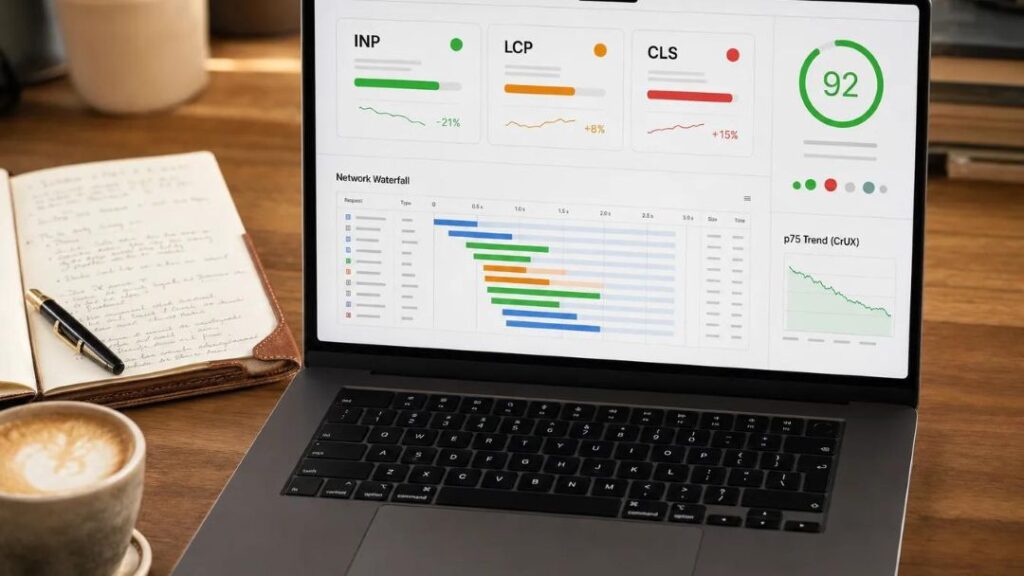
Pay attention to these three Core Web Vitals metrics:
- Largest Contentful Paint (LCP): Measures how quickly the main content becomes visible. A good result is 2.5 seconds or less.
- Interaction to Next Paint (INP): Measures how quickly a page responds to user interactions. A good result is 200 milliseconds or less.
- Cumulative Layout Shift (CLS): Measures unexpected layout movement. A good result is 0.1 or less.
These thresholds are assessed at the 75th percentile of page visits. Lab test results can help with troubleshooting, while field data provides insight into the experience of real visitors when sufficient data is available.
When Should You Hire a Website Developer?
Some website speed improvements can be made through image compression, caching and basic configuration. However, more complex performance problems may require technical expertise.
Consider consulting a website developer if:
- Your website remains slow after basic optimization.
- Your pages have poor Core Web Vitals results.
- Your website relies on complex plugins or integrations.
- Your online store experiences slow product or checkout pages.
- You need to optimize server configuration or website code.
- Performance improvements cause layout or functionality problems.
A professional website review can help identify the underlying causes of slow performance and prioritize improvements according to your business needs.
Frequently Asked Questions (FAQs)
What is website speed optimization?
Website speed optimization involves improving the loading and responsiveness of a website through techniques such as image compression, caching, code optimization and better hosting configuration.
Does website speed affect Google rankings?
Website speed and Core Web Vitals contribute to Google’s page experience assessment. However, good performance alone does not guarantee higher rankings. Useful content, relevance, technical SEO and other factors also matter.
How can I improve my WordPress website speed?
Start by optimizing images, reviewing plugins, enabling appropriate caching and checking your hosting performance. You can then investigate CSS, JavaScript and other technical issues if your website remains slow.
Is a CDN necessary for every website?
No. A CDN can be beneficial for websites serving visitors across different locations or delivering large amounts of static content. Smaller websites with limited traffic may have other performance improvements to prioritize first.
How often should I test my website speed?
Test your website after major design changes, plugin installations, hosting changes or significant content updates. Periodic checks can also help you identify performance issues as your website grows.
Conclusion: Build a Faster Website for Your Business
Website speed optimization is an important part of maintaining a professional online presence. By optimizing images, choosing suitable hosting, enabling caching, reviewing plugins and monitoring performance, businesses can make their websites more responsive and easier to use.
A faster website can support a better customer experience and complement your broader SEO efforts. The best approach is to measure performance, identify the most important problems and make improvements without compromising functionality.
At Sliver Interactive, we understand the importance of building and maintaining websites that support business goals. Whether you need a new website, performance improvements or help with your digital presence, choosing the right solution starts with understanding your requirements.
Want to improve your website’s performance? Contact Sliver Interactive to discuss your website development and optimization needs.